STEP 01 / BOOK
Request a LIVE ride
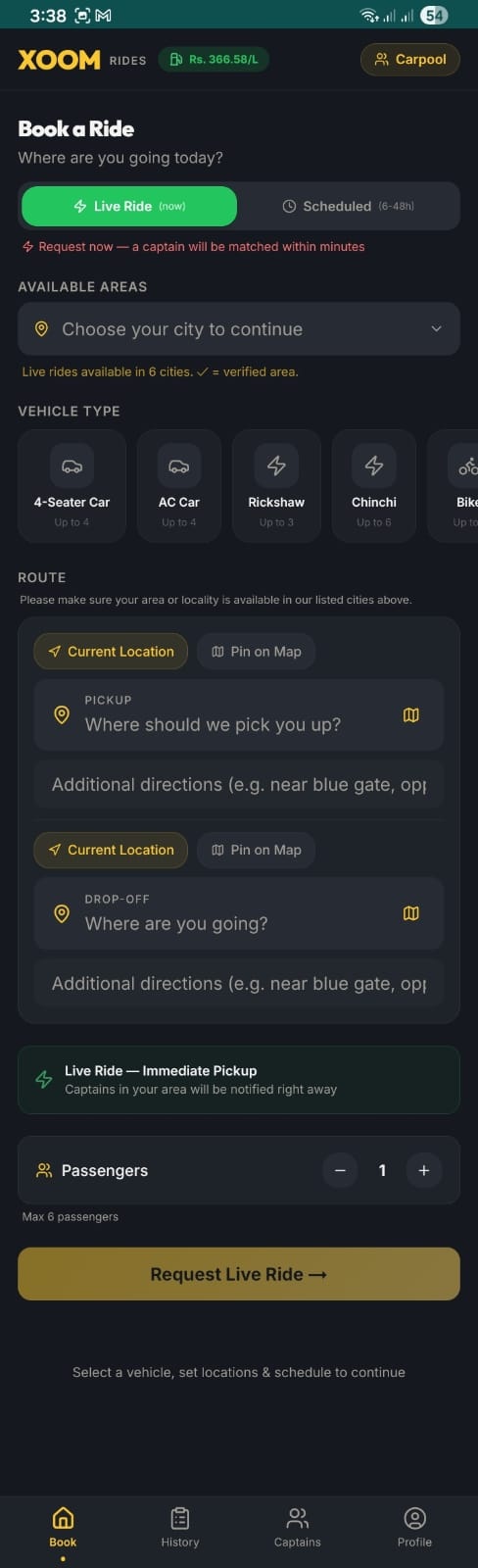
The Book tab is your starting point. Choose LIVE Ride for an instant pickup — captains in your area get notified right away and can offer you a ride within minutes.
- Open the XOOM app and tap the Book tab in the bottom navigation.
- Select ⚡ Live Ride (now) at the top — this is for immediate pickups. Use "Scheduled" if you want to book 6–48 hours ahead.
- Choose your city from the available areas dropdown. LIVE rides are available in 6 verified cities.
- Pick your vehicle type: 4-Seater Car, AC Car, Rickshaw, Chinchi, or Bike.
- Set your pickup location using Current Location or Pin on Map. Add extra directions if needed (e.g. "near blue gate, opposite park").
- Set your drop-off location the same way.
- Adjust the number of passengers using the +/− control (max 6).
- Tap Request Live Ride → to post your request. Captains nearby will be notified instantly and can make you an offer.
How it worksOnce you post, captains in range see your request with the route and fare range. They make offers, you pick the best one — then your captain heads straight to you.
Book